
Cluster Setup overview
In the following, an exemplary cluster setup is described. It enables a high performance of eperi sEcure Platform, in particular with regard to searching and indexing of data.
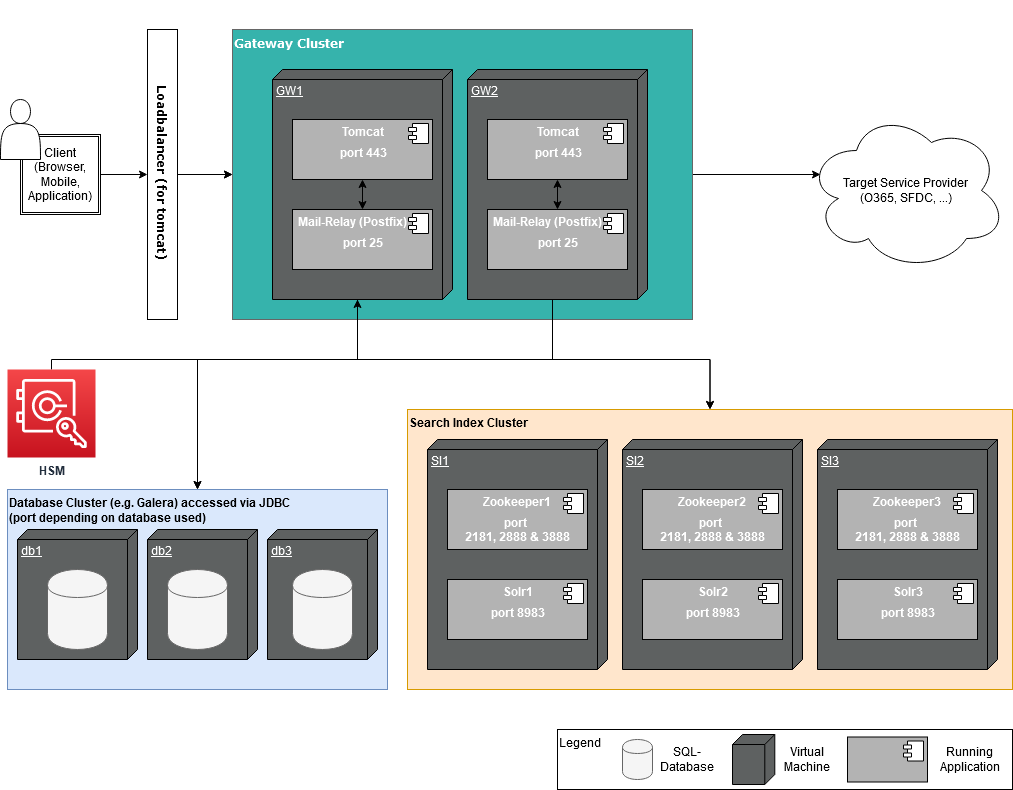
Network port requirements
The above setup requires to open the following network ports:
| Instance | Network ports & protocols |
|---|---|
| eperi sEcure Platform instances |
443/tcp = eperi sEcure Platform Reverse Proxy, SSL terminated e.g. 8081/tcp = eperi sEcure Platform Forward Proxy, SSL terminated 8443/tcp = eperi sEcure Platform Administration |
| Solr instances (with ZooKeeper) |
2888/tcp = Zookeeper Peers 3888/tcp = Zookeeper Peers 8983/tcp = Solr Client Connections 2181/tcp = Zookeeper Client Connections 47500-47600/tcp = Ignite Connectivity 47100-47200/tcp = Ignite Connectivity ICMP (optionally) = Ignite ICMP Discovery |
| Database instances |
For example for MariaDB: 3306/tcp = MariaDB Connections 4444/tcp = State Snapshot Transfers 4567/tcp = Galera Cluster replication traffic 4567/udp = Galera Cluster replication traffic 4568/tcp = State Snapshot Transfers |
Solr Monitoring
For information about how to monitor Solr, see the section Monitoring Solr in the Apache Solr Reference Guide.
Solr Safeguarding
- Encryption of the file system on OS level.
- Solr runs on it's own user, therefore read & write permissions can be restricted.
Synchronization among eperi sEcure Platform instances
In a cluster setup, each eperi sEcure Platform instance is connected to an instance of the DB cluster. The instances of the DB cluster are automatically synchronized, so that each eperi sEcure Platform instance always has the same dataset regarding the configuration via Admin Console and the generated tokens. However, certain configuration changes (such as changing the app or data protection policy configuration) require that the appropriate proxy be restarted in each eperi sEcure Platform instance. If necessary, this is noted in the relevant section of this manual.
Configuration changes made on the command line (such as changing the Tomcat configuration or local system settings) will not be synchronized automatically. If necessary, they need to be performed manually on every node of the cluster individually (as well as a restart of the eperi sEcure Platform instances and/or proxies).