
Select a CA TLS Key (only for forward proxy)

If it is required to use your own trusted CA for a forward proxy (instead of the root certificate of the eperi sEcure Platform), you can assign it to the forward proxy by invoking the Edit Proxy dialog.

Before you begin

You have already created and imported your own CA TLS Certificate as a PKCS #12 key store as described in section Creating a subordinate CA Certificate for a Forward Proxy.

Procedure

  1. From the Services > Proxies menu, click the forward proxy you would like to configure.
  2. Ensure that the TLS Enabled switch is enabled and the Use default certificate switch is disabled.
  3. From the Key Name dropdown, select the private key of your PKCS #12 key store.
    Figure 1: Forward proxy - Select private key
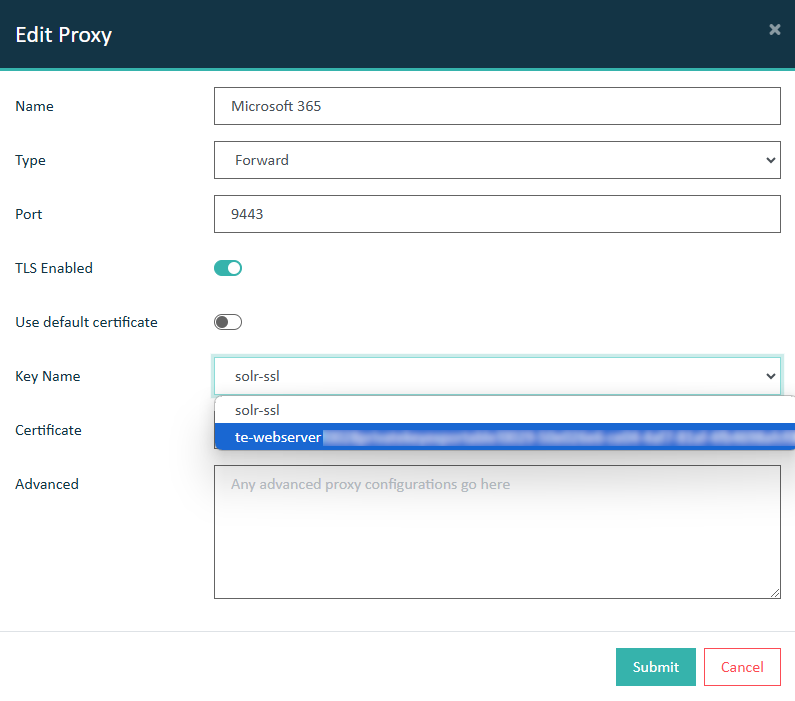
    Proxy - Select private key
  4. From the Certificate dropdown, select the certificate of your PKCS #12 key store.
    Figure 2: Forward proxy - Select certificate
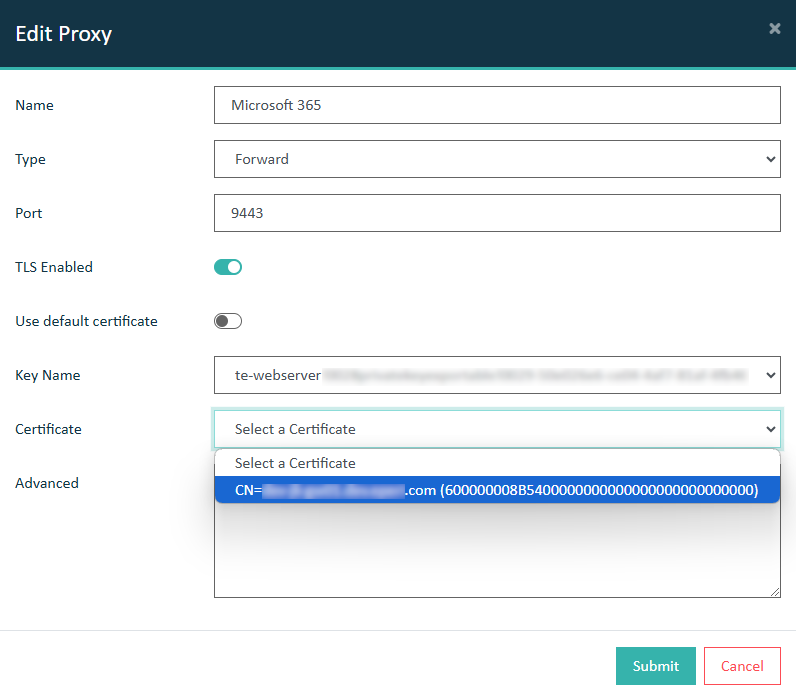
    Proxy - Select certificate
  5. Click Submit to save the configuration.

Results

You have successfully assigned a TLS certificate to a proxy.