
Advanced Settings
Select to view and modify advanced settings of the eperi sEcure Platform, the eperi sEcure Salesforce, and the eperi sEcure M365.
Example: For the setting Enable Token DB please follow the instructions in section Configuring a separate database for token values.
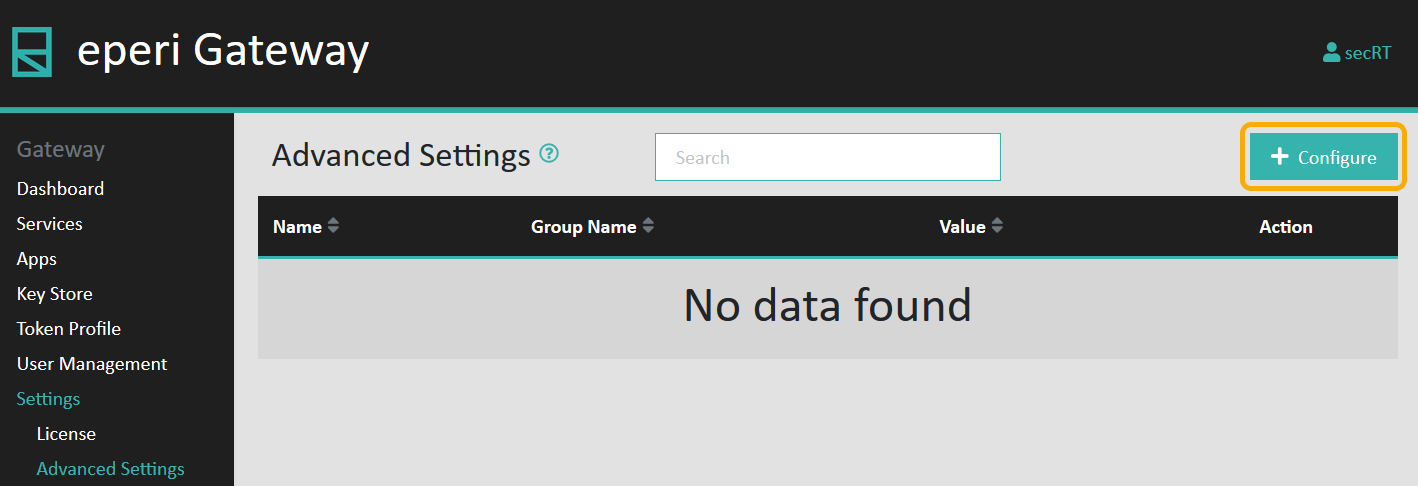
- Click Configure in the upper right corner:
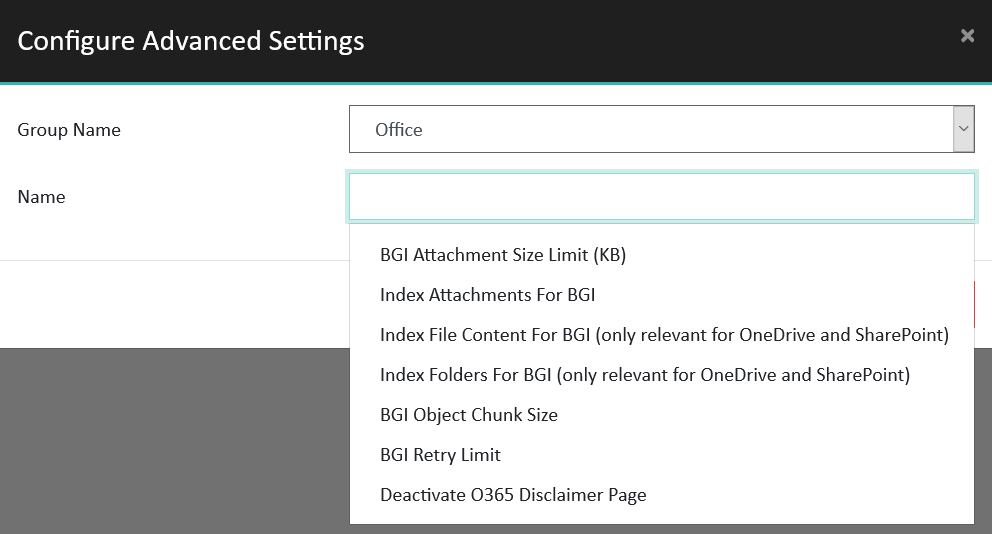
- In the Configure Advanced Settings menu, first select a
Group Name, for example Office
(for settings related to the eperi sEcure M365).
Then, select a setting in the Name field:
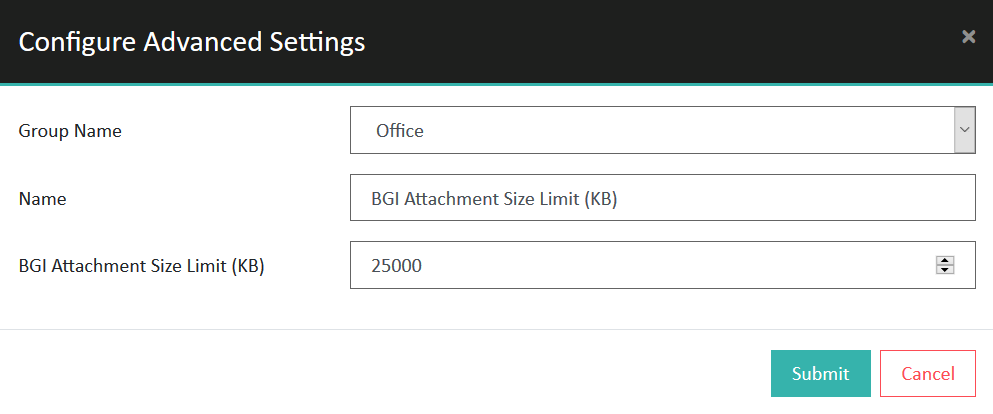
- Adjust the setting as needed, then click Submit:
Settings for eperi sEcure Platform (platform)
| Setting | Explanation | Possible values | Default value |
|---|---|---|---|
| Cluster Failure Detection Timeout (ms) | This setting sets the timeout for basic network operations for server nodes. | Detection timeout in milliseconds | 30000 |
| Cluster Node Discovery Acknowledge Timeout (ms) | This setting is only relevant for a cluster setup with multiple eperi sEcure Platform nodes.
Apache Ignite provides cluster-wide synchronization. Using this setting, you can control the discovery acknowledge timeout for node discovery. |
Ignite socket timeout in milliseconds | 50 |
| Cluster Node Discovery Socket Timeout (ms) | This setting is only relevant for a cluster setup with
multiple eperi sEcure Platform nodes. The cluster-wide synchronization is realized with Apache Ignite. Using this setting, you can control the discovery socket timeout for node discovery. |
Ignite socket timeout in milliseconds | 200 |
| Cluster Seed Addresses | This setting is only relevant for a cluster setup with
multiple eperi sEcure Platform nodes. By default, each eperi sEcure Platform node has its own local token cache. To activate a cluster-wide replicated token cache and other cluster-wide features, configure the IP addresses and ports of all eperi sEcure Platform nodes in your cluster. Apache Ignite manages the synchronization of the cluster. Important:
|
A comma-separated list of IP addresses:ports of all eperi sEcure Platform nodes, e.g., 192.168.180.153:47500, 192.168.180.154:47500 | 127.0.0.1 |
| Cluster Seed Subnets | This setting is only relevant for a cluster setup with multiple eperi sEcure Platform nodes. The same network restrictions and cluster-wide features mentioned in the Cluster Seed Addresses setting apply here. With it, you can define your eperi sEcure Platform nodes as subnets, if the nodes represent a block of contiguous IP addresses. | A comma-separated list of CIDR blocks, e.g., the subnets 192.168.180.0/29, 192.168.180.252/30 define a cluster of 8 nodes having the following IP addresses:
192.168.180.1 192.168.180.2 192.168.180.3 192.168.180.4 192.168.180.5 192.168.180.6 192.168.180.253 192.168.180.254 |
None |
| Debugging flags | Reserved, i.e., not yet implemented | N/A | N/A |
| DecryptionKeyCacheInitialSize | With this setting, you can adjust the initial size of the
cache for decryption keys. Important: All Gateway
nodes must be restarted for the setting to take
effect. |
Number of decryption keys specified as an unsigned integer value Note: The
initial cache size must be lower than or equal to the
maximum cache size. |
21000 |
| DecryptionKeyCacheMaxSize | With this setting, you can adjust the maximum size of the
cache for decryption keys. Important: All Gateway
nodes must be restarted for the setting to take
effect. |
Number of decryption keys as an unsigned integer value | 30000 |
| Domain for generating Message-IDs | The domain specified will be used as part of the Message-ID if the Override Message-ID for outbound emails setting is enabled and the string provided is not empty. | Any domain name, e.g., example.com. The validity of the supplied domain name is not verified. | Standard internal Message-IDs |
| Enable AgeCheck Token Profile | With this setting, you can activate or deactivate the AgeCheck token profile that validates age upon tokenization. The date provided will only be tokenized if it is greater/less than the minimum/maximum age of the token profile, respectively. | Switch on = Creating AgeCheck token
profiles is possible and there is a default AgeCheck
token profile. Switch off = Creating AgeCheck token profiles is not possible. |
Switch off |
| Enable Certificate Pinning | When enabled, eperi sEcure Platform allows only TLS connections to targeted systems having a TLS certificate that has been added to its Trusted TLS Issuer list. | Switch on = Certificate pinning is enabled. Switch off = Certificate pinning is disabled. |
Switch off |
| Enable conditions on token profiles | Conditional tokenization can be enabled with this setting. | Switch on = Conditional tokenization is enabled. Switch off = Conditional tokenization is disabled. |
Switch off |
| Enable DateTime Token Profile | With this setting, you can activate or deactivate DateTime/DateTimeMillisecond token profiles that provide tokens with granularity in seconds or milliseconds, respectively. | Switch on = Creating DateTime/DateTimeMillisecond Token Profiles is possible and there are default DateTime/DateTimeMillisecond token profiles. Switch off = Creating DateTime/DateTimeMillisecond token profiles is not possible. |
Switch off |
| Enable PDF file encryption with BlobV2 | With this setting, you can activate or deactivate APIs which can be used for generating PDF files from XML-based input files (e.g., *.docx or *.xml) that contain tokenized values. | Switch on = PDF encryption and decryption via POST requests enabled. Switch off = PDF encryption and decryption via POST requests disabled |
Switch off |
| Enable Token DB | With this setting, you can activate or deactivate a separate database for token values.
If you plan to activate a separate database for token values, please follow the instructions in section Configuring a separate database for token values. |
Switch on = Separate token database is
activated Switch off = Separate token database is deactivated |
Switch off |
| Exclude mail attachments with an ASN.1 PKCS#7 SignedData signature. | Email attachments having a file signature for ASN.1 PKCS#7 SignedData content will not be encrypted. | Switch on = Do not encrypt email attachments with an ASN.1 PKCS#7 SignedData signature.
Switch off = Encrypt email attachments with an ASN.1 PKCS#7 SignedData signature. |
Switch off |
| Exclude mail attachments with the configured file signatures from being processed (comma-separated HEX values, example: 30800609 | Email attachments with signatures in the specified list will not be encrypted. | A comma-separated list of HEX values, e.g., 30800609, a1b2c3d4 | None. All attachments will be encrypted. |
| Exclude mails from being processed with the configured content-types (comma-separated, example: multipart/signed,application/pkcs7-mime | When enabled, emails with at least one attachment that matches any of the specified content types will not be processed. | A comma-separated list of content types, e.g., text/css, application/octet-stream | None. All attachments will be encrypted. |
| Enable Utimaco Key Validation | With this setting, you can turn on the validation of Utimaco Keys. | Switch on = Utimaco Key Validation is
enabled Switch off = Utimaco Key Validation is disabled |
Switch off |
| Executor Thread Count | Configure how many threads the background task executor should have on each node in the cluster. | Number of threads as an unsigned integer value | 4 |
| Executor Thread Interval (milliseconds) | 3000 | ||
| Explicit commit after indexing | Configure whether documents added to the Solr client should be committed immediately or on the next determined commit execution. | Switch on: The documents will be committed right after being added to the Solr client.
Switch off: The commit will be executed along the next determined commit |
Switch off |
| Indexing File Size Limit (KB) | Sets the size limit of a single file, which can be indexed by BGI. | Size of the file in KB. | 25600 |
| Indexing flags | With this setting, you specify the integer value associated with the indexing flag you wish to activate. To enable multiple flags, specify the sum of the values of each flag you want to activate, e.g., specifying the value 3 will disable both search and indexing. Likewise, entering 12 will log both queries and object IDs. | 1 - Disable indexing 2 - Disable search 4 - Log queries 8 - Log object IDs 16 - Disable extract contents, i.e., the content of attachments will not be indexed if they are attachment types that would normally be indexed, such as Word documents. Other attachment types, like image files, are already excluded from indexing. |
0 |
| Max time (in ms) before a commit will happen after indexing | Configure the maximum time that eperi sEcure Platform will wait before executing the next Solr commit. | Time in ms. | 15000 |
| Message digest creation period | Maximum time allowed between the creation of an email ID in eperi sEcure Platform and the generation of a message digest for the corresponding email. You can adjust the value to reduce the number of database entries. It is recommended to not set it too low to support delayed sending of emails. | Number of days as an unsigned integer value | 40 days |
| Message digest validity period | Sets the validity period of the message digest. | Determined validity period of the message digest feature. | 48 hours |
| Non-websocket protocol switch request allowed default value | The eperi sEcure Platform can use protocols other than the WebSocket protocol to communicate with endpoints . | Switch on: The eperi sEcure Platform can communicate with endpoints using non-WebSocket protocols.
Switch off: The eperi sEcure Platform is restricted to the WebSocket protocol for communicating with endpoints. |
Switch off |
| Override Message-ID for outbound emails | With this setting, the Message-ID of outbound emails can be customized. | Switch on: A custom Message-ID for outbound emails is generated. The domain can be configured in the Domain for generating Message-IDs advanced setting. Switch off: No Message-ID customization. | Switch off |
| Proxy socket timeout | This setting sets the eperi sEcure Platform's internal socket timeout. This timeout value may be increased in case large files time out during upload. | Socket timeout in milliseconds | 600000 |
| Proxy SSL certificate validity | This setting allows to adjust the validity of the certificate for SSL proxies. The certificate is generated on proxy start. | Number of days as an unsigned integer value | 730 |
| RSA key length | With this setting, you can define the RSA key length, thus allowing you to import or create certificates with longer keys. | The length in bits | 4096 |
| Send outbound mail if message digest for email body cannot be verified | This setting lets you choose whether or not to send emails if their message digests can't be verified. | Switch on: Emails will be
sent and log messages will be written in the following format: >>>>> MESSAGE
DIGEST ...
Switch off: Emails with message digests that can't be verified will not be sent, and a stack trace will be written to the logfile. |
Switch off |
| The maximum number of threads allowed by a Service Listener | Configure the number of threads allowed by a service listener in case the default thread limit is exhausted. | Number of threads as an unsigned integer value | 2000 |
| Use message digest for mails | This setting activates and deactivates the message digest feature for emails. | Switch on Message digest for emails is
switched on. Switch off: Message digest for emails is switched off. |
Switch off |
| Use protocol header in websocket request if no endpoint is configured | If an endpoint is not registered, its address will be derived from the protocol header of the WebSocket request. | Switch on: The unconfigured endpoint's address will be derived from the protocol header of the WebSocket request.
Switch off: The eperi sEcure Platform will not will not answer with a request to switch protocols. |
Switch on |
| Validate hostnames in websocket upgrade request | Each endpoint's hostname will be validated. Otherwise, endpoint hostnames will not be validated. Normally, the initial connection is via TLS, in which case the TLS certificate will contain the hostname of the endpoint as either the common name or as the subject alternative name. | Switch on: Endpoint hostnames will be validated.
Switch off: Endpoint hostnames will not be validated. |
Switch on |
| Verify email recipients before calculating message digest | With this setting, you can define whether or not email recipients should be verified. Verification means the recipients are compared with the recipients stored in M365. Precondition: Background indexing needs to be configured. M365 needs to index emails before sending and must not delete them immediately after sending. | Switch on: Email recipients will be verified, i.e., they are compared with the recipients stored in M365.
Switch off: Email recipients will not be verified. |
Switch on |
| XML elements which need to be Base64 decoded before being processed by generic decryption (XPath expressions separated by ,) | This setting lets you define XPath expressions to specify which XML elements should be Base64 decoded before being processed by generic decryption. | Comma-separated XPath expressions. | None |