
Protecting a CSV file

How to protect a CSV file with the web service.

Procedure

  1. Create a SOAP request for the operation protectCSV.
  2. Configure the parameters in the SOAP request:
    Table 1. SOAP request parameters
    Parameter Type Description
    policyName String; required Name of the policy setting which should be applied to the columns of the CSV file.
    Important: The configuration must first be created in the Admin Console. For details see Setting up the data protection policy for your CSV file.
    csvFileName String; required File name of the CSV file attached. This field will be sent back in the response.
    csvFile String; required; Format: cid:<ID> Content ID – This has to be the same Content ID of the attached CSV attachment in the SOAP request.
    isFullValidationRequired Boolean; required; default: false Before the web service tokenizes a CSV file, it checks the CSV for possible errors. If the parameter is set to false, the test is terminated on the first error found and an error message is output. If the parameter is set to true, the file is checked completely and then all error messages are output.
    fieldSeparator String; optional; default: ; (semicolon) The field separator used in the CSV file.
    dataSeparator String; optional; default: " (double quotes) The data separator used in the CSV file.
    header String; optional; default: 1 The line number of the header line.
    ignoreBefore String; optional; default: 0 The number of lines to be ignored from the beginning.
    ignoreLast String; optional; default: 0 The number of lines to be ignored from the end.
    columnList / columnName String; optional List of column names in the CSV file if no header is specified.

    For example:

    <columnName>ACC_NUM</columnName>

    <columnName>ID_CODE</columnName>

    <columnName>CUST_REF</columnName>

  3. Remove any optional parameters in the request that you have not set.
  4. Attach the CSV file to the SOAP request.
  5. Enter the same ContentID set in the parameter csvFile in the field ContentID of the file attachment.
    Figure 1: SOAP request - protectCSV
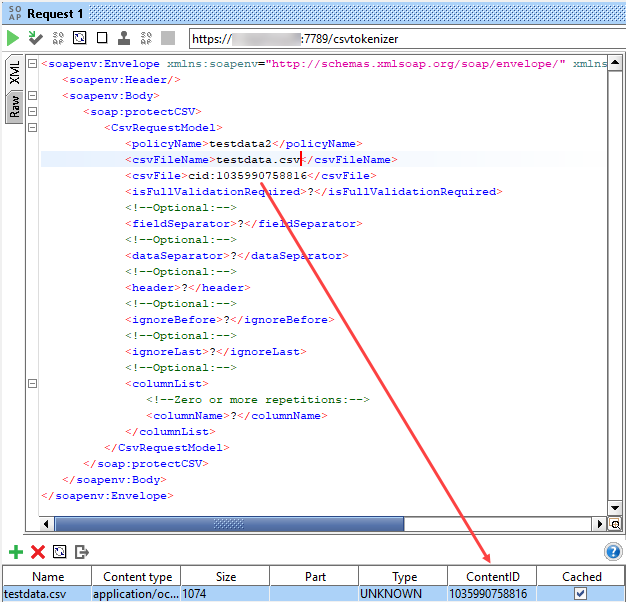
    SOAP request - protectCSV
  6. In the request properties set the property Enable MTOM to true.
  7. Submit the request.

Results

The web service returns a CSV file in which the fields are tokenized or encrypted according to the configured policy setting. Additionally, the following status codes and status texts are returned in the response:
Table 2. Status codes and texts in web service response
Status code Status text
10 "Success"
31 "no csv file provided"
32 "csv is not valid"

Additionally, a detailed error list is provided.

33 "IllegalStateException occurred: " + <error message>
34 "FileNotFoundException while creating a temp file"
35 "IOException while creating a temp file"
36 "Exception occurred: " + <errorMessage>
37 "General exception occurred"

The response also contains a unique requestId. The requestId can be used to distinguish the logs for the respective request in the log file.