
Configuring HSM encryption in eperi sEcure Platform
Configure the encryption settings for your HSM instance ineperi sEcure Platform.
Before you begin
- Your HSM device/hardware and the HSM client are correctly set up and configured. Please see the topic Connecting a Luna HSM to eperi sEcure Platform for instructions how to do this in case of a Luna HSM.
- You have manually copied the respective "provider" JAR file to the folder
/opt/eperi/gateway/tomcat/webapps/ROOT/WEB-INF/lib.
- For a Luna HSM: LunaProvider.jar
- For a Utimaco HSM: CryptoServerJCE.jar
- Have the credentials of your HSM instance ready. For a Luna HSM those are:
- Provider slot
- HSM password
- HSM partition
- HSM key alias
- For a Utimaco HSM those are:
- HSM device (e.g. 3001@hostname)
- HSM username
- HSM password
- HSM key alias
- HSM key group (optional)
- HSM key specifier (optional)
About this task
Note: In the following, the process is shown using the example of a Luna HSM. For a HSM
of another manufacturer, the procedure is analogous.
Procedure
-
In the Keys tab click + New.
Figure 1: eperi sEcure Admin Console - New key 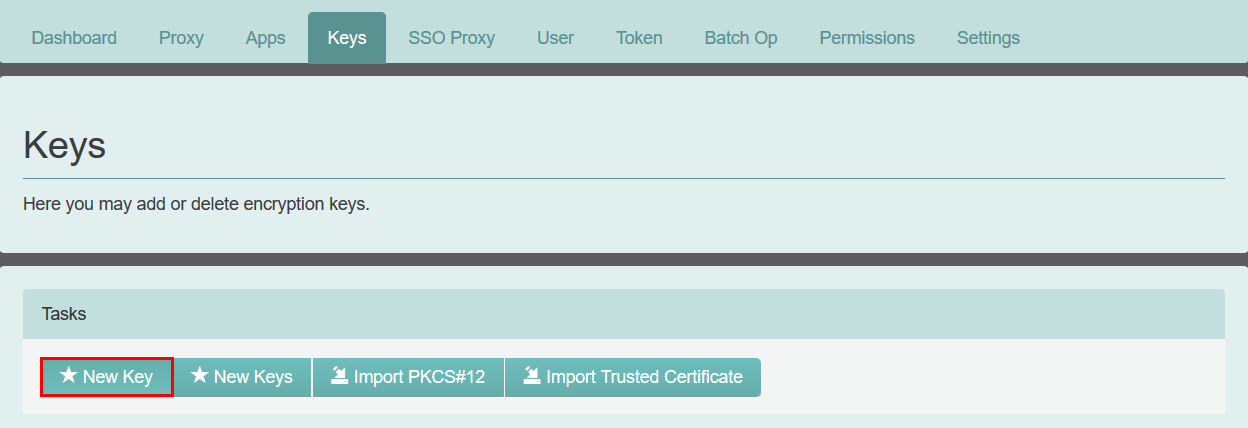
-
In the pop-up Encryption Settings enter a Key
name of your choice and select the Encryption
Method, e.g. Luna - AES/CBC/PKCS5Padding
in case of a Luna HSM.
Table 1. Available encryption methods Encryption method Description Luna - AES/CBC/PKCS5Padding Encryption with the Advanced Encryption Standard (AES), Key size: 256 bits, Cipher Block Chaining (CBC) mode of operation and PKCS#5 padding. Key generation, encryption and decryption take place within the Luna Hardware security module (HSM) that is connected to the eperi sEcure Platform. Utimaco - AES/CBC/PKCS5Padding Encryption with the Advanced Encryption Standard (AES), Key size: 256 bits, Cipher Block Chaining (CBC) mode of operation and PKCS#5 padding. Key generation, encryption and decryption take place within the Utimaco Hardware security module (HSM) that is connected to the eperi sEcure Platform. Utimaco - AES/GCM/NOPADDING Encryption with the Advanced Encryption Standard (AES), Key size: 256 bits, Galois/Counter Mode (GCM) mode of operation and no padding. Key generation, encryption and decryption take place within the Utimaco Hardware security module (HSM) that is connected to the eperi sEcure Platform. Figure 2: New key - encryption settings 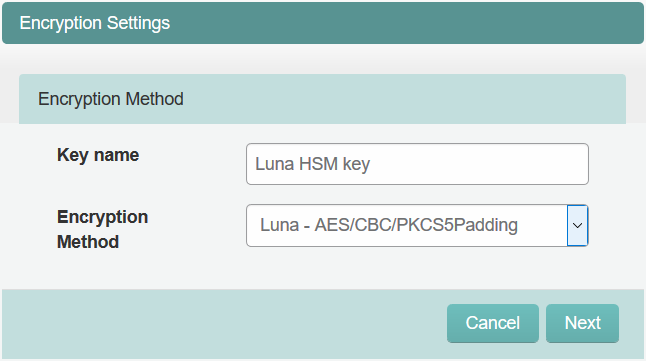
-
Enter the credentials of your Luna HSM and click
Finish.
Important: Please note that the HSM Partition and the Key alias are case sensitive and need to exactly match the HSM's configuration.Note: Only Encryption Keys on the same Luna Partition can be accessed by eperi sEcure Platform.
Figure 3: New key - HSM credentials 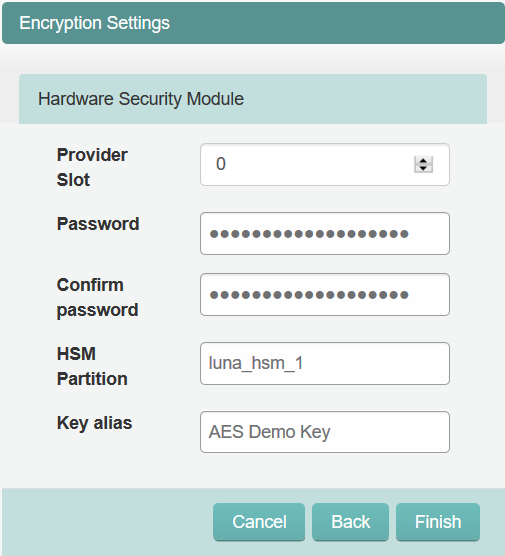 You have created a reference to the respective encryption key in your HSM.
Results
Important: Please make sure to backup
the encryption keys in your HSM since eperi sEcure Platform only stores a
reference to them!
If you want to use a new HSM key for encryption, you can set up a new key (reference) to the new HSM key and hide the old key (reference) in eperi sEcure Platform. Then the eperi sEcure Platform will still use the old HSM key for decrypting existing values.
Changing the key alias of a key in use either in eperi sEcure Platform or the HSM will result in eperi sEcure Platform not being able to decrypt values anymore which were encrypted with that key!