
Connecting a Luna HSM to eperi sEcure Platform
Please note the following hints to connect a Luna HSM to eperi sEcure Platform.
About this task
Hardware Setup
It’s a mandatory prerequisite to correctly set up and configure the Luna HSM device/hardware.
This can be verified by using the vtl tool. The command vtl verify should show the correct partition: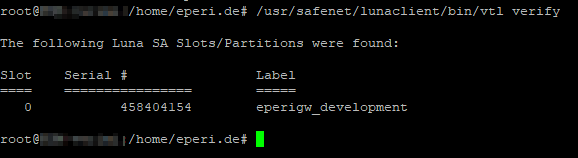
Procedure
Depending on the operating system you run eperi sEcure Platform on,
install the appropriate low level drivers and configure them to integrate as a
PKCS11 provider into the Java Cryptography Architecture.
How to do this is described in the HSM installation guide and the Luna HSMs and Java PKCS11 Providers Integration Guide delivered by the manufacturer. Furthermore, the manufacturer ships a utility named "ckdemo". This will allow you to check if your configuration was successful.