
Microsoft Teams Forward Proxy App
This app is required for the Teams functionality while the eperi sEcure Platform is operating as a forward proxy.
Dependency
None.
Settings
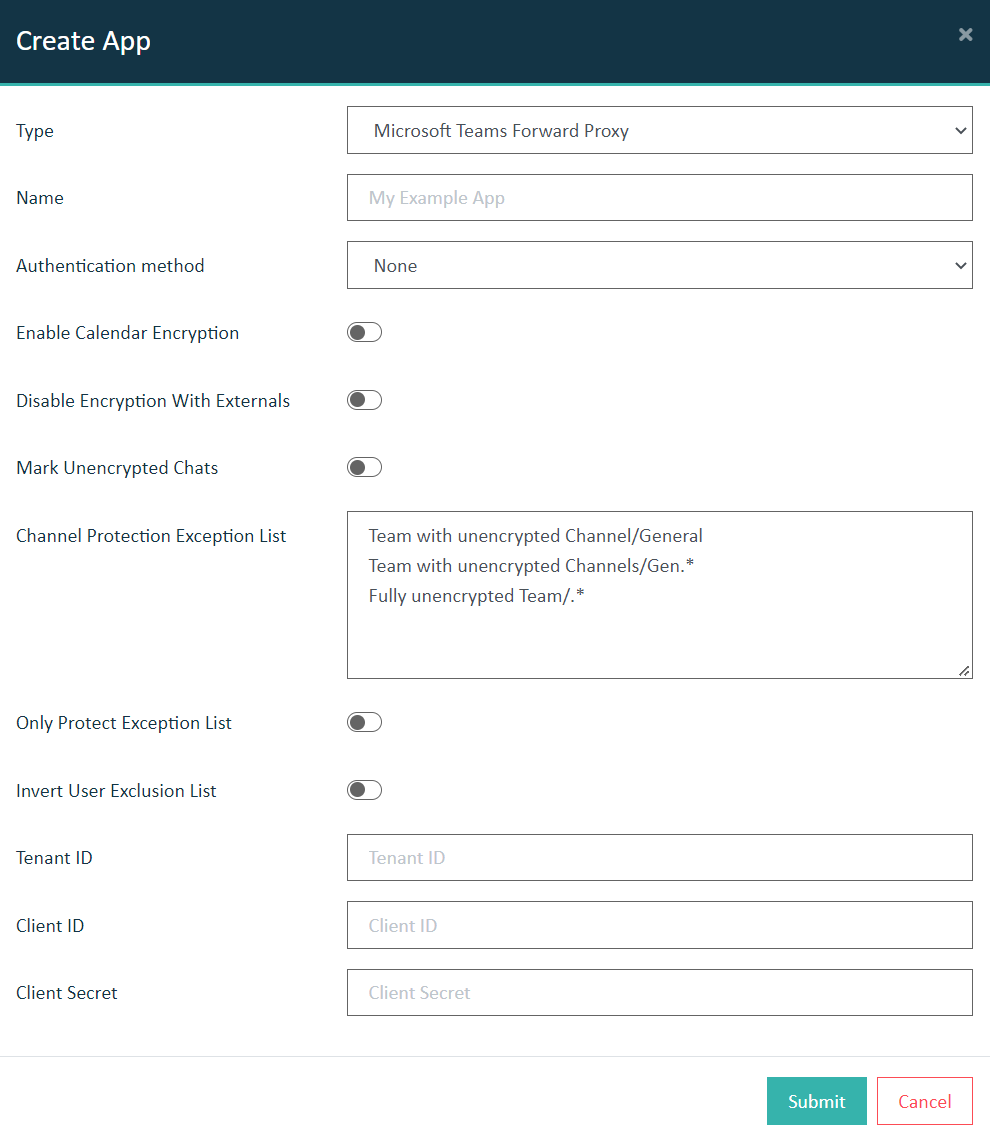
Enable Calendar Encryption: (Optional) Set it to true so that calendar appointments in Teams are encrypted.
Mark Unencrypted Chats: (Optional) Set it to true so that chats with externals which are not encrypted based upon the above setting are marked as "(Unencrypted): [original chat name]" in the Chat title for all members.
- Provide the Teams Channels as Regular Expressions in the format: <Team>/<Channel Name>.
- The default created Channel is not affected by this setting, and will always be encrypted, regardless of what the setting is for this or other <Team>/<Channel Name>
Only Protect Exception List: Inverts the functionality of Channel Protection Exception List by only protecting Channels which match any of the patterns.
Invert User Exclusion List: The Teams chats of the users defined in Settings > Teams Exclusion List Users will be encrypted while the chats of those not in the list will no longer be encrypted.
Tenant ID: Paste the value which you have copied from the field Directory (tenant) ID of the eperi sEcure Platform app you registered in the Azure Active Directory.
Client ID: Paste the value which you have copied from the field Application (client) ID of the eperi sEcure Platform app you registered in the Azure Active Directory.
Client Secret: Paste the client secret value which you have copied from the section Client secrets of the eperi sEcure Platform app you registered in the Azure Active Directory.