Performing a rolling upgrade to a new release
How to rolling upgrade your current eperi sEcure Platform installation to a new release.
Before you begin
- The eperi sEcure Platform has been installed using the automated installation packages. In the case of a manual deployment with the WAR file, please refer to Upgrading to a new eperi sEcure Platform WAR file.
- A user with admin rights is required.
About this task
Important:
In a cluster setup with multiple eperi sEcure Platform nodes proceed as follows:
- Back up the eperi sEcure Platform and Token database.
- Perform the upgrade of the first eperi sEcure Platform node as described below while keeping the other nodes offline.
- Once the eperi sEcure Platform has started up successfully on the first node, proceed in the same pattern with all other eperi sEcure Platform nodes.
Important: Before performing the upgrade, please refer to
the Upgrade Notes under Release Notes of your current version.
Procedure
-
Execute the package manager with root privileges to install the new version of the eperi sEcure Platform, for example:
For Ubuntu:
For RHEL:sudo dpkg -i eperi-gateway-<version>.x86_64.deb
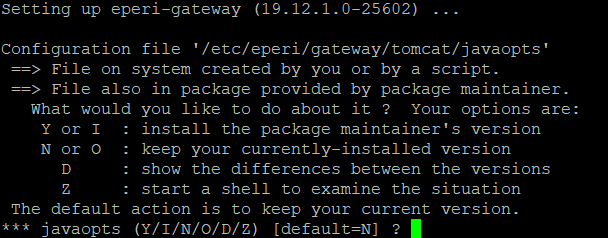
For SLES:sudo rpm -U eperi-gateway-<version>.<RHEL-version>.x86_64.rpmsudo rpm -U eperi-gateway-<version>-<buildnumber>.sles15.x86_64.rpmThe old version of the application under /opt/eperi/gateway/tomcat/webapps/ROOT is automatically backed up to /opt/eperi/gateway/backup/<current date/time> and the new version is installed.Note:For Ubuntu:During the setup, you may be asked, which version of a configuration file should be used. If you have modified such a configuration file before, please review the differences and merge them manually.
 Note: For RHEL:In case a configuration file has changed, the currently installed configuration file remains untouched. The new version of the file (from the installation package) is saved as <filename>.rpmnew.
 -
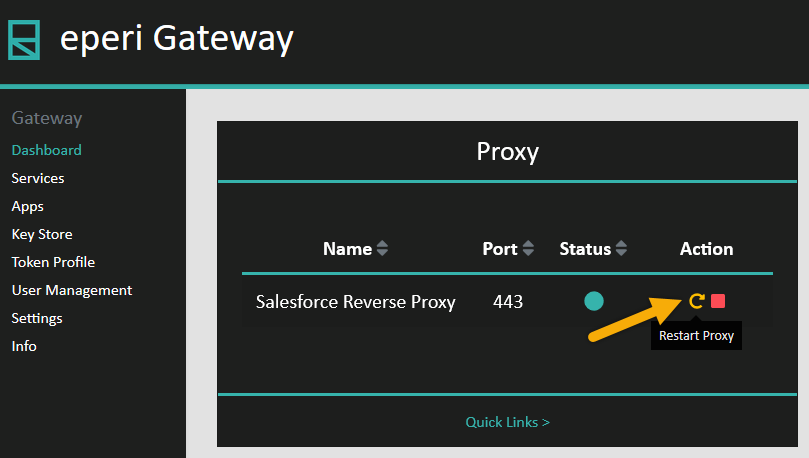
Restart the proxy service on the Dashboard page.
Figure 1: Restart the proxy service