
Salesforce Community Classic Reverse Proxy App (Sandbox configuration)
This app is required, if you have a Salesforce Community Classic Site that should be tokenized/encrypted by eperi sEcure Platform. Here the configuration for a Sandbox environment is described.
Dependency
Requires the Salesforce Reverse Proxy App (Sandbox configuration).
Settings
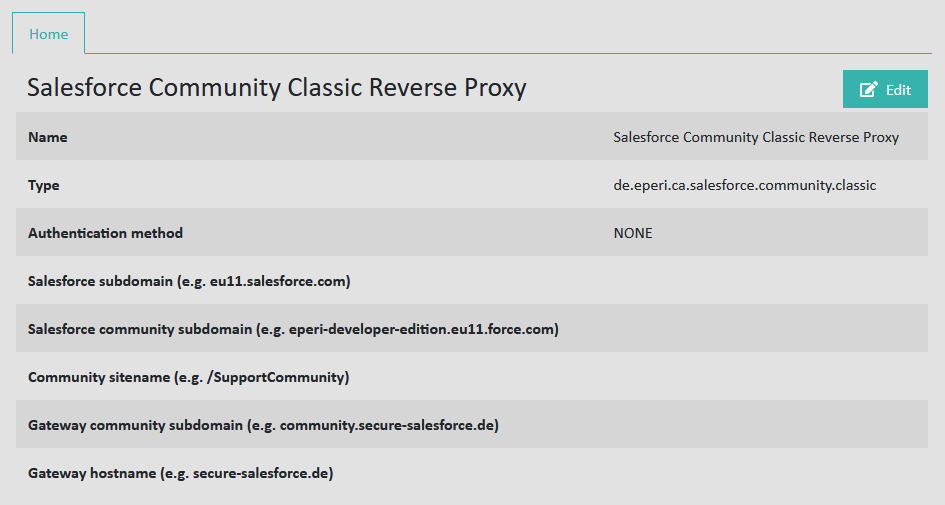
Name: See Standard settings for apps
Type: See Standard settings for apps
Authentication method: See Standard settings for apps
Salesforce subdomain: <myCompanyName>--<sandboxName>.<myInstance>.my.salesforce.com, e.g. eperi--qa.cs99.my.salesforce.com
Salesforce community subdomain: <sandboxName>-<myCompanyName>.<myInstance>.force.com, e.g. qa-eperi.cs99.force.com
Community sitename: The last part of your community URL, e.g. /customers, if your Community URL is for example qa-eperi.cs99.force.com/customers. If your Community URL is just the domain name for Communities, e.g. qa-eperi.cs99.force.com, then just enter a / (slash).
Gateway community subdomain: The hostname of your eperi eperi sEcure Platform instance with the prefix community, e.g. community.secure-salesforce.com.
Gateway hostname: The hostname of your eperi sEcure Platform instance, e.g. secure-salesforce.com.