Activating a disclaimer page before Salesforce login (optional)
You can optionally activate a disclaimer page which is displayed when somebody accesses the (gated) Salesforce login page for the first time.
About this task
Some browsers show warning messages in case a phishing threat is detected on a page (e.g., by the Google Safe Browsing API). To prevent the gated Salesforce login page being suspected of phishing while it is being displayed under your eperi sEcure Platform hostname, you can activate a disclaimer page before the login. This illustrates to crawlers that the page is intentionally available under a non-Salesforce domain.
If the disclaimer page is activated, it will be displayed as soon as someone accesses the login page of the secured Salesforce for the first time. After clicking on the Continue button the login page will be displayed. Internally, the cookie "disclaimerPageCookie" will be set to true in the browser. As long as the cookie is set, the disclaimer page is no longer displayed. If the cookie is reset or deleted, the page is displayed again the next time the login page is accessed.
Instead of the default disclaimer page, you can also configure a custom disclaimer page.
- The file name has to be disclaimerpage.html and must be available in the /opt/eperi/gateway/tomcat/webapps/ROOT/etc folder of the eperi sEcure Platform.
- The HTML file has to be valid HTML and has to contain one and only one element with the id "continueButton".
For example:
<html lang="en">
<head>
    <meta charset="UTF-8">
    <title>Disclaimer page</title>
</head>
<body>
    <button id="continueButton" >Continue</button>
</body>
</html>
- The element with the id "continueButton" does not need to be a button, but must be clickable.
Procedure
-
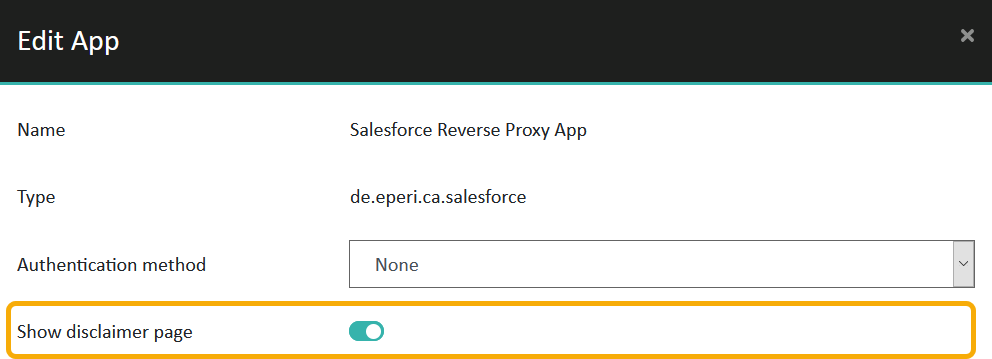
Switch on Show disclaimer page, then click
Submit.
Figure 1: App configuration - Show disclaimer page