Configuring the eperi sEcure Platform SSO Issuer
Configure the eperi sEcure Platform SSO Issuer in eperi sEcure Platform.
Procedure
-
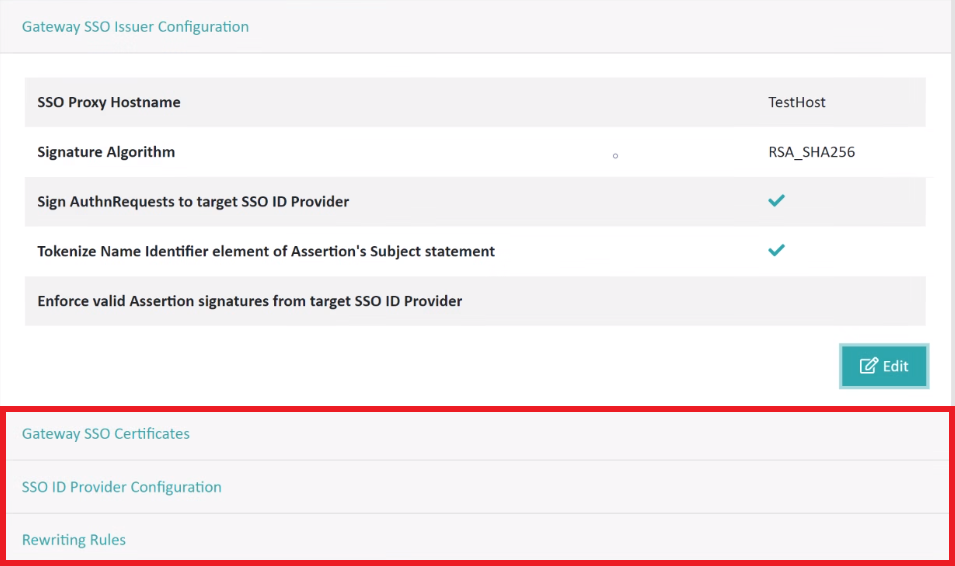
Provide the required information in the Gateway SSO Issuer
Configuration section and then click
Apply.
Option Description SSO Proxy Hostname Enter a hostname on which the SSO proxy is available. We recommend to use a hostname that is different from the eperi sEcure Platform hostname, e.g., a subdomain of the eperi sEcure Platform hostname like sso.t-venus.milkyway.local.Important:- The SSO Proxy Hostname entered must point to the IP Address of the eperi sEcure Platform server.
- The SSL certificate of the already configured reverse proxy must contain the SSO Proxy Hostname as subject alternative name (if you don't have a wildcard certificate).
Signature Algorithm Select a Signature Algorithm. Important: The selected signature algorithm must fit to signature methods configured in your cloud application and your ADFS server.Sign AuthnRequests to target SSO ID Provider This option is checked by default, so that the AuthnRequests to your target SSO Identity Provider are signed. If your target SSO Identity Provider cannot process signed AuthnRequests, then you may uncheck this option. Important: Every time you change this option after you have already completed the SSO configuration before, you will need to reimport the Relying Party Trust Metadata from eperi sEcure Platform into your ADFS. In this case, proceed as follows: In your ADFS, delete the SSO eperi sEcure Platform as Relying Party Trust, and then repeat the steps as described in section Importing metadata from eperi sEcure Platform into ADFS.Enforce valid Assertion signatures from target SSO ID Provider This option is checked by default, so that valid Assertion signatures from your target SSO Identity Provider are enforced. If your target SSO Identity Provider cannot provide valid Assertion signatures, then you may uncheck this option. Important: Every time you change this option after you have already completed the SSO configuration before, you will need to re-import the Relying Party Trust Metadata from eperi sEcure Platform into your ADFS. In this case, proceed as follows: In your ADFS, delete the SSO eperi sEcure Platform as Relying Party Trust, and then repeat the steps as described in section Importing metadata from eperi sEcure Platform into ADFS.Tokenize NameIdentifier element of Assertion's Subject statement This option enables the tokenization of the NameID element of the Assertion’s Subject statement with String type, if a token for the value of the NameID already exists.
As an example for Salesforce:Check this option, if you have set a StringToken policy to the FederationIdentifier field of the Salesforce User Object.
The eperi sEcure Platform SSO Proxy then checks, when parsing the assertions in the SAML Response, whether there is a token for the value of the NameID.
If so, the SSO Proxy sets the token in the SAML Response. If there is no token for the value, the original value is retained.Note: The FederationIdentifier is case sensitive so that variations in spelling generate different tokens.Figure 1: Gateway SSO Issuer Configuration 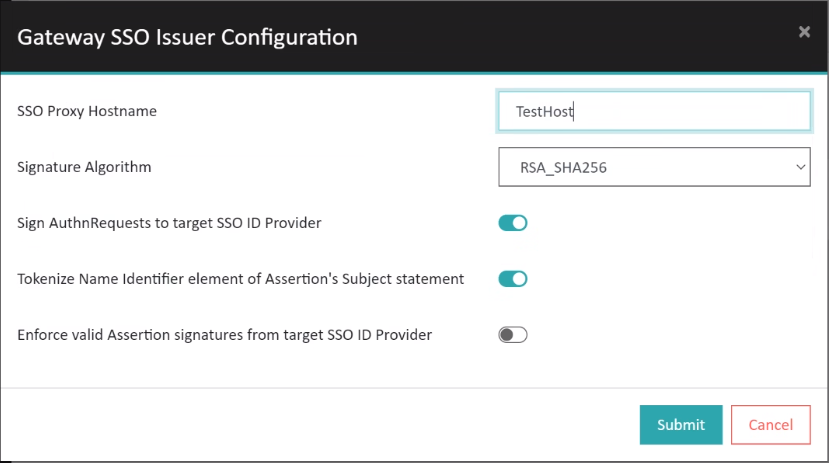
Results