Deactivating an administrator account

How to deactivate an administrator account.

Procedure

  1. Select User Management > Administrator in the main menu.
  2. In the list of administrators, click the Edit action for the corresponding entry.
    Figure 1: Edit the admin account
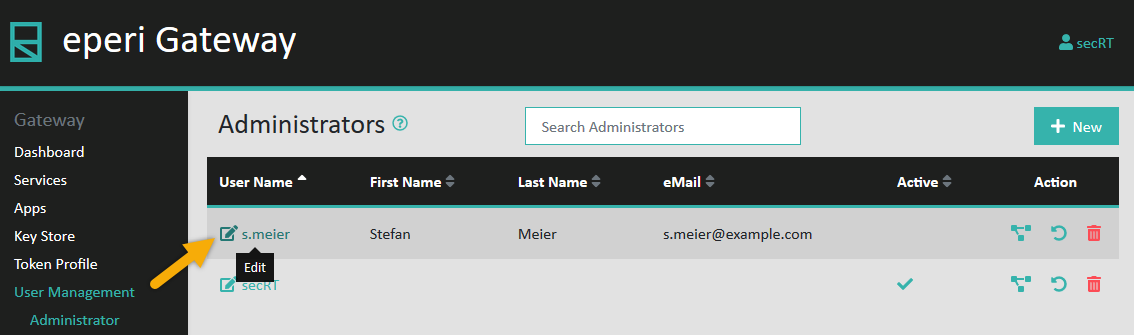
    Edit the admin account
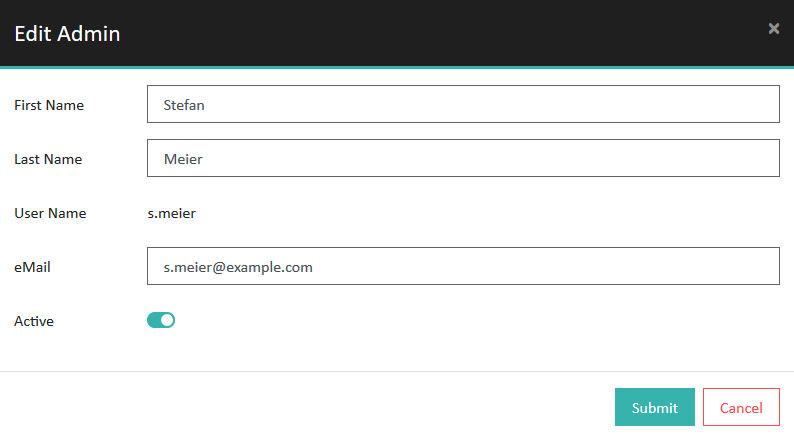
    A pop-up will open, showing you the details of the administrator account.
    Figure 2: Details of the admin account
    Details of the admin account
  3. Turn off the Active switch and then click Submit.

Results

You have deactivated the respective administrator account. The user cannot log in to the eperi sEcure Admin Console anymore. The user can log back in to the Admin Console only after it has been reactivated. The account is inactive, as it has no green check mark in the Active column.
Figure 3: Inactive admin account
Inactive admin account